A button that does nothing is easy. A button that does nothing sometimes is a different animal. There's no stack trace, no red line to jump to, no failing assertion. Just a thing that works when you watch it and breaks when you don't.
This is the writeup of one of those. The bug is small. The reason it happened is not, and the part I actually want to talk about is how you corner a bug that refuses to be deterministic and the browser mechanic hiding underneath it that most of us never have to think about: what a "click" actually is.
Wrong turns included, because the wrong turns are half the method 😂.
/TLDR/
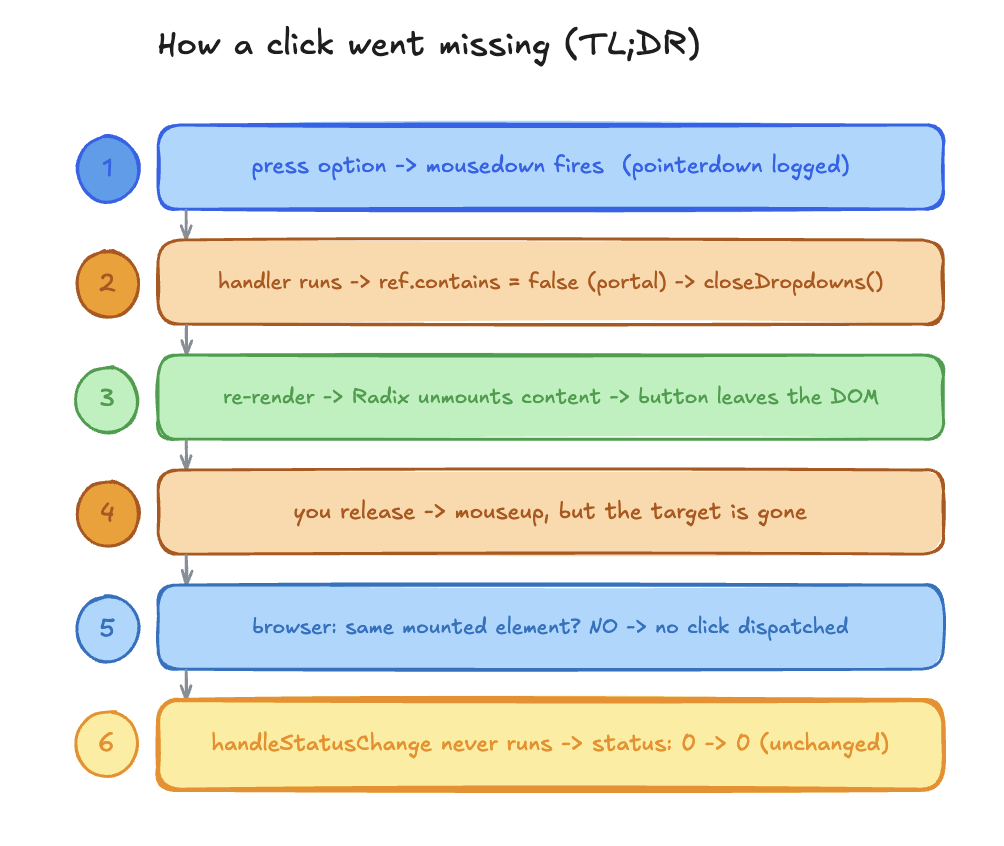
The symptom
There's a dialog with a list of rows. Each row has a small status dropdown open it, pick one of three options, the badge updates. Standard stuff. React, with the dropdown built on a Radix Popover (shadcn under the hood).
The report: "I pick a status and nothing changes, after i edit a particular GRN(Goods Received Note)"
No error. No crash. The dropdown closes and the value stays the same. And the detail that makes it a real bug instead of a quick fix: it only happened sometimes. Same button, same screen. Click once, works. Click again, dead. QA said it was broken. I said it worked. We were both right, which is the most annoying way to be right.
Moreover the reported bug had edited flow in the JIRA ticket so first i checked that while checking this i found out that it was not only happening with edited but the non edited ones too and was totally random..
Wrong turn 1: the variable named like the bug
First thing I found looked guilty:
const isDisabled = Boolean(disabledOptions[obj.grn_id]?.includes(opt.value));A disabledOptions map, read to grey out choices. If options were getting disabled, that would explain a dead click.
Except I grepped the repo. disabledOptions was only ever set to {}. Initialized empty, reset empty, never filled. Always empty, so isDisabled was always false. Dead code wearing the bug's name tag.
Lesson 0: a variable named like the bug is usually not the bug. It just pattern-matches to your panic.
Wrong turn 2: the overwrite
Next theory: the component recomputes its state on every click and stomps my selection. There's a big useEffect that builds the initial statuses when the dialog opens my guess was it re-runs and overwrites.
So I stopped guessing and logged it. Logged the click handler too.
The effect did not re-run on click. The handler, when it fired, updated state correctly every single time. So when it worked, it genuinely worked. The state logic was fine.
That's two suspects cleared by logging instead of theorizing which matters, because the next step only works if you trust that the logic isn't the problem.
The wall: identical input, different output
Here's where I lost an hour.
I pulled the actual data for two rows that behaved differently. Byte for byte identical. Same id type, same quantities, same status, everything. One worked. One didn't.
Sit with that. If two inputs are identical and the outputs differ, it cannot be the data. The data is not the variable. Something non-deterministic is happening, and it lives in timing, not in values.
That single observation reframed the whole hunt. Stop reading the data. Start watching the events.
The method: instrument the lifecycle
First, what "nothing changed" actually meant. The status could only be one of three values:
0  ->  not recorded
1  ->  partially recorded
2  ->  recorded
So the bug was precise: I'd click option 2, and the logged status would still read whatever it was before 0, unchanged. The number never moved.
I stopped theorizing about what should happen and logged what actually fired. Three probes:
on the option button:
onPointerDownin the click handler (
handleStatusChange): the value it receivedon the popover:
onOpenChange(open/close)
Then I clicked a failing option and read the trace:
option POINTERDOWN   -> { optValue: 2 }
popover onOpenChange -> false        (it's closing)
... handleStatusChange never logs ...
status still 0
And there's the contradiction that cracked it. pointerdown fired every single time the press was reaching the button but the status never moved off its old value. The thing that's supposed to set the status to 2 simply never ran.
That's the question that turned the whole investigation: if the press is registering but the value doesn't change, then the click in between is going missing. pointerdown is recorded so why isn't the click? What actually sits between me pressing the button and handleStatusChange running, and where does it fall off?
Which sent me somewhere I hadn't thought about in years: what even is the lifecycle of a click?
The deep part: a "click" is not one event
Turns out the answer to that question is the bug. We say "click" like it's a single thing. It isn't. A pointer click is a sequence:
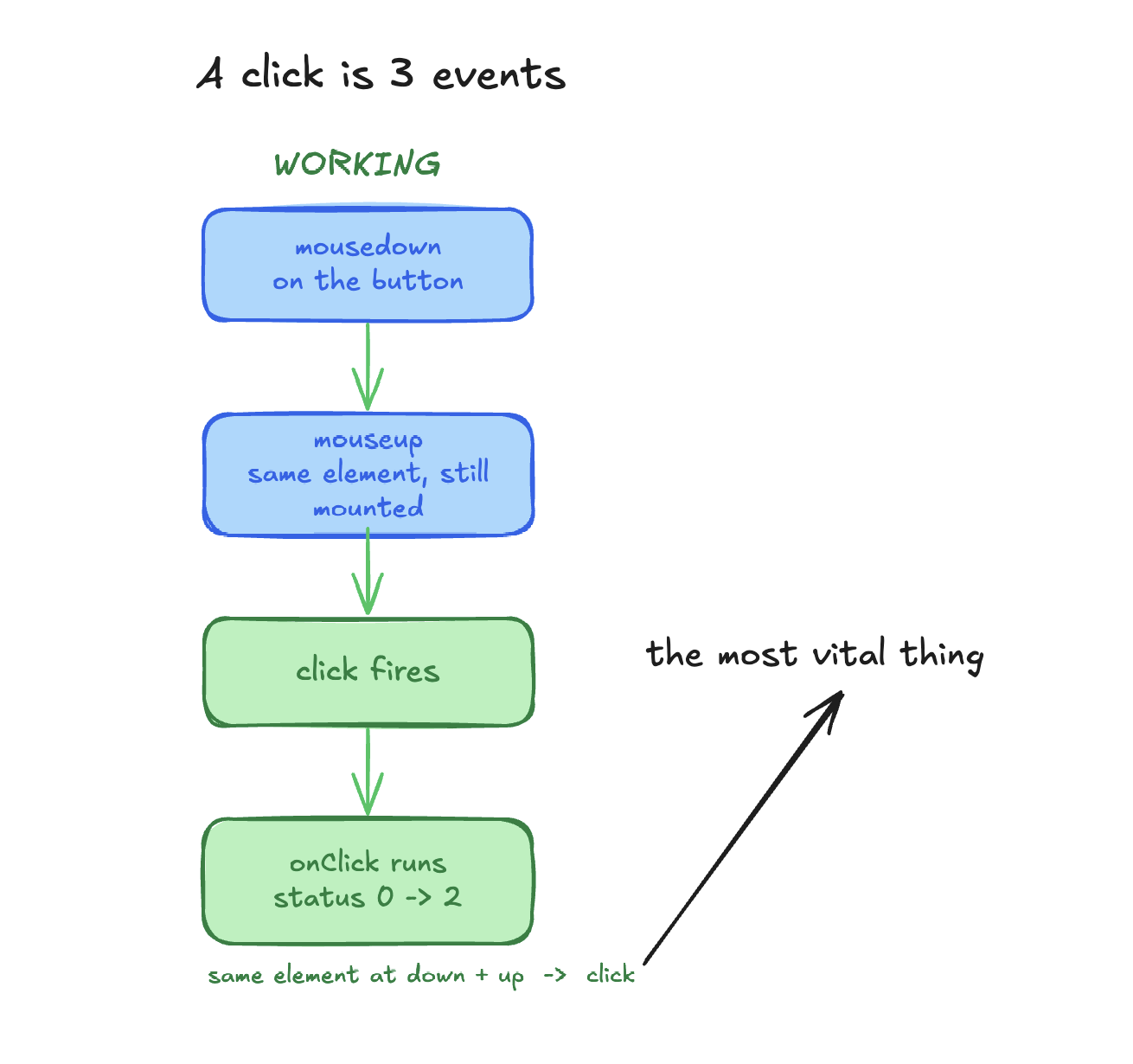
mousedown -> mouseup -> clickmousedown and mouseup are the two physical events finger down, finger up. click is a third, synthesized event the browser dispatches only if a specific condition holds:
mousedownandmouseupmust occur on the same element, and that element must still be in the dom when you release.
That rule is the whole ballgame here, so it's worth saying why it exists. A click isn't "a mouseup happened." It's "a complete press-and-release gesture landed on one target." The browser is modelling intent: you pressed this thing and let go on this thing, so you meant to activate this thing. If the element you pressed is gone by the time you release, there is no shared target, the gesture is incomplete, and the browser does the correct thing it dispatches no click at all. It doesn't error. It silently declines.
So the question stopped being "why didn't my handler run" and became: what removed my button between mousedown and mouseup?
The cause: a portal makes "inside" look like "outside"
The dialog had a hand-rolled "click outside to close" handler:
useEffect(() => {
  if (!open) return;
  const handleClickOutside = (event: MouseEvent) => {
    const target = event.target as Node;
    const isAnyOpen = Object.values(openDropdowns).some(Boolean);
    if (!isAnyOpen) return;
    const clickedInside = Object.values(dropdownRefs.current).some(
      ref => ref?.contains(target)
    );
    if (!clickedInside) closeDropdowns();
  };
  document.addEventListener('mousedown', handleClickOutside);
  return () => document.removeEventListener('mousedown', handleClickOutside);
}, [open, openDropdowns]);
Two things to notice. It listens on mousedown early in the sequence, before mouseup. And it decides inside-vs-outside with ref.contains(target), where the refs point at the row elements.
Now the detail that breaks it: the Popover content renders in a Radix Portal, mounted at document.body.
<PopoverPrimitive.Portal>
  <PopoverPrimitive.Content ... />
</PopoverPrimitive.Portal>
Portals exist for a good reason they let floating content escape overflow: hidden clipping and stacking-context / z-index traps by rendering at the top of the DOM instead of nested inside the component. The cost is that the content is no longer a DOM descendant of the thing it visually belongs to. The option buttons look like they're in the row. In the actual tree, they're at the bottom of <body>.
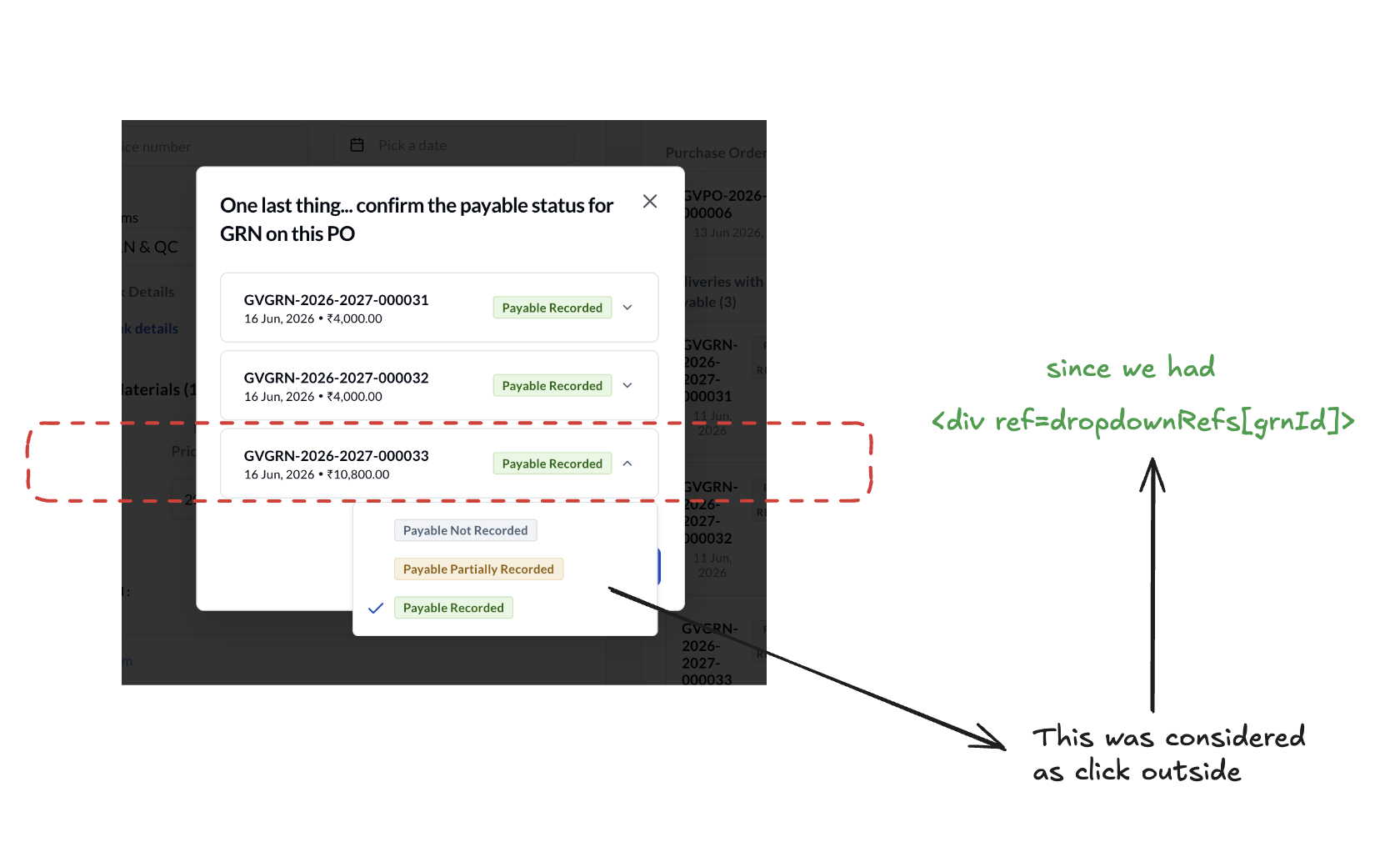
So:
dropdownRefs.current[grnId].contains(optionButton) -> falseThe handler asks "is this click inside the row?", the button isn't a descendant of the row (it's in the portal), the answer is false, and the handler concludes you clicked outside when you clicked the dropdown's own option.
Chain it together:
Press down on an option →
mousedownfires on the button.mousedownbubbles todocument→handleClickOutsideruns →ref.containsisfalse(portal) →closeDropdowns().React re-renders, Radix unmounts the popover content → the button you're pressing leaves the DOM.
You release →
mouseupfires, but its target is gone.Browser checks "same element, still present?" → no → no
clickdispatched →handleStatusChangenever runs → status never changes.
mousedown killed the thing you were about to click.
Why it was flaky (the race)
If the close were instant and total, every click would fail, deterministically, and I'd have caught it in five minutes. It wasn't, and that's the part that ate my time.
Closing isn't atomic. It's a state update, then a re-render, then Radix tearing the content down and the popover has a close animation, so the node lingers for a few frames while it fades. There's a tiny window where the button still exists. Whether your click survives is a race between:
how fast you let go (a quick down-up sometimes beats the unmount),
the close animation keeping the node alive a beat longer,
React's flush timing,
and a
scroll-into-vieweffect that nudges the list when a dropdown opens, sliding the target out from under the cursor for lower rows.
Top rows: no scroll, stationary target, usually won the race. Lower rows: scroll kicks in, target moves, lost almost every time. That's why it presented as "these specific rows are broken" when the truth was "these rows have worse odds." Every repro looked a little different, which is exactly what made it feel unpinnable and exactly what the identical-rows clue had already told me: timing, not data.
The tell I should have caught on day one
Keyboard worked the entire time. Tab to an option, press Enter, status changes, every time.
Because keyboard activation dispatches a click directly there's no mousedown, so the outside-handler never fires, nothing closes early, the click lands.
mouse / touch :  mousedown -> (handler closes it) -> click lost
keyboard      :  click (no mousedown, nothing closes) -> works
That's a free diagnostic I'll remember: a bug that's specific to one input type points straight at how that input is handled. Mouse and touch break but keyboard is fine → the culprit is something hanging off a pointer event, not the click logic itself.
One honest note on touch: I'm reasoning, not reporting. Mobile is a separate codebase and I didn't reproduce it there. But it should hit touch too browsers synthesize a mousedown from a tap for compatibility, and a synthesized mousedown trips the same handler. Inferred, not confirmed.
The fix
Delete the handler. −23 lines, +1 comment.
The Popover library already does outside-click dismissal, correctly, via onInteractOutside → onOpenChange. It knows the portal is its own content, so clicking an option doesn't count as outside:
<Popover
  open={isDropdownOpen}
  onOpenChange={open => setOpenDropdowns({ [grnId]: open })}
/>
The custom handler was reimplementing something the library already did except worse, because it didn't account for the portal it was fighting. It was redundant and it was the bug. Once it was gone, the lifecycle is just the normal one: press, release, click fires, status updates. Mouse, touch, keyboard, all identical, because nothing closes the popover on press anymore. The race doesn't exist because the thing causing it doesn't exist.
What I took from it
The custom code was the bug; the library was right. When you wrap a battle-tested component and bolt your own global listeners on top, you're usually re-deriving invariants it already guarantees and you only have to get one of them wrong. Here the invariant was "the option is part of my content," and the portal quietly made it false.
Portals break your DOM intuition. ref.contains(target) returns false for anything portaled out, even when it visually lives inside. Any "is this click inside" check has to account for it, which is exactly why the library does and the hand-rolled version didn't.
mousedown is not free. Closing or unmounting something on mousedown can eat the click that was about to happen, because the click depends on the target still being there at mouseup. If you only need "did they click outside," let the component own that.
Identical input, different output means stop reading the data. It's timing. Go watch the events. That reframe was the single highest-leverage move in the whole hunt.
The fix was deleting 23 lines. The lesson wasn't. Next time a button "sometimes" does nothing, I'll know the click I'm looking for might never have fired at all.